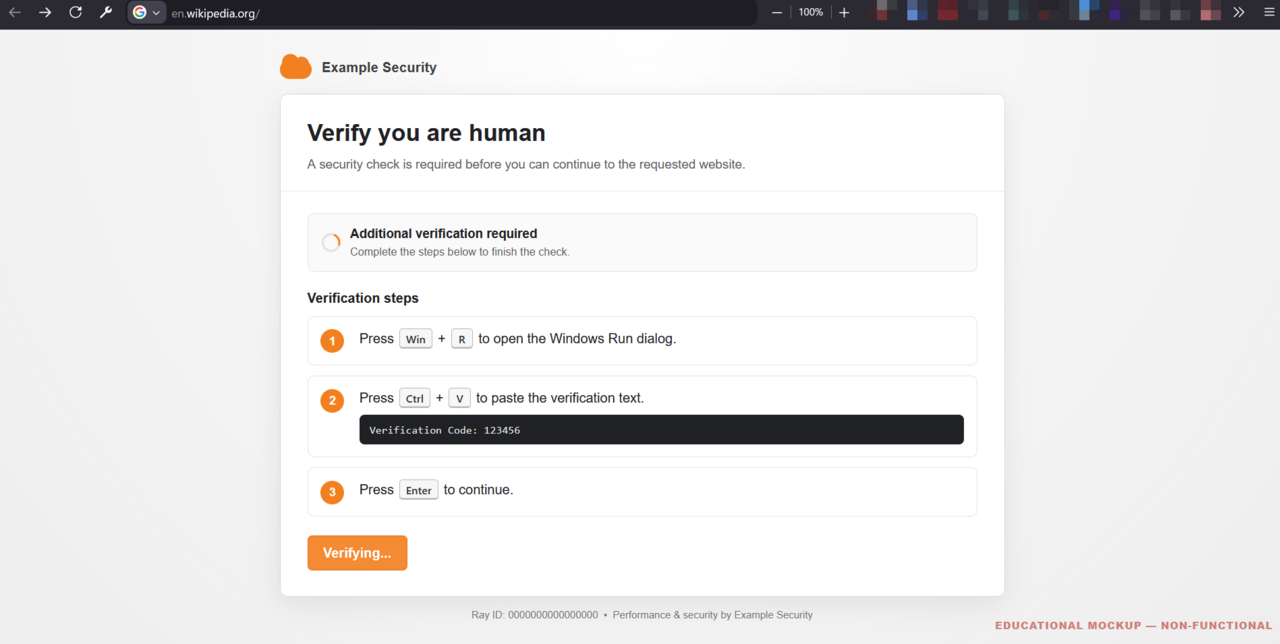
browser cache security is becoming a pressing issue as ClickFix smuggles payloads through it to bypass Windows run limits. This tactic raises concerns about user safety and data integrity.
What is ClickFix?
ClickFix is a newly discovered technique that takes advantage of browser cache security vulnerabilities to circumvent Windows run limits. By smuggling malicious payloads through the browser cache, it enables attackers to execute unauthorized applications without triggering security measures typically enforced by the operating system.
Here are some key points about ClickFix:
- Exploitation Method: It utilizes the browser’s caching mechanism to store harmful files temporarily.
- Bypassing Security: This method allows for the evasion of traditional security barriers set by Windows.
- Impact: Users may unknowingly execute compromised programs that exploit their system’s vulnerabilities.
As the importance of browser cache security becomes more evident, understanding these techniques is crucial for both users and cybersecurity professionals.
Understanding Browser Cache
Understanding browser cache is crucial for recognizing its role in security vulnerabilities. Browser cache stores web page resources locally on a user’s device, allowing for quicker access during subsequent visits. However, this convenience can become a double-edged sword when it comes to browser cache security.
Malicious actors can exploit cached data to smuggle harmful payloads, bypassing security measures such as Windows run limits. This tactic takes advantage of the fact that cached content can be retrieved without requiring user permissions, posing a significant risk.
Key points to consider regarding browser cache security include:
- Data Persistence: Cached files can remain on devices longer than intended.
- Unauthorized Access: Attackers can access sensitive information stored in the cache.
- Mitigation Strategies: Regularly clearing cache can help reduce risks.
How ClickFix Works
ClickFix operates by exploiting vulnerabilities within the browser cache security system. It uses a method that allows malicious payloads to be stored in the cache, which can then be accessed without triggering any security protocols typically enforced by Windows. This technique takes advantage of how browsers manage cached data, enabling attackers to smuggle harmful files into a user’s system.
The process of ClickFix involves several steps:
- Payload Preparation: Attackers craft a payload designed to bypass security measures.
- Cache Storage: The payload is saved in the browser cache, remaining undetected.
- Execution: When the user interacts with the browser, the payload is executed, circumventing Windows run limits.
This method highlights significant concerns regarding browser cache security and the need for enhanced protective measures.
Implications for Windows Users
The implications of browser cache security are significant for Windows users, especially in light of the ClickFix vulnerability. As this technique demonstrates, malicious actors can exploit the browser cache to deliver payloads that bypass standard Windows run limits. This undermines the integrity of the operating system, raising concerns about data protection and user privacy.
Windows users should be particularly vigilant in understanding how their browser cache operates and the potential risks associated with it. Key points to consider include:
- Increased Vulnerability: Exploiting browser cache security can lead to unauthorized access to sensitive information.
- Mitigation Strategies: Users must implement regular cache clearing and update their browser settings to enhance security.
- Awareness and Education: Understanding these threats is crucial for maintaining digital safety.
Best Practices for Security
To enhance browser cache security, users should adopt several best practices. First, regularly clearing the browser cache can help mitigate risks associated with outdated or malicious files. This process can be automated or done manually through the browser settings.
Second, using private browsing or incognito modes can limit the amount of data stored in the cache, thereby reducing potential vulnerabilities. Additionally, keeping browsers and their extensions updated ensures that any security flaws are patched promptly.
Moreover, employing security-focused browser extensions can add an extra layer of protection against unwanted scripts and payloads. Lastly, educating users about the risks associated with browser caches and the importance of safe browsing habits is crucial in preventing attacks like those facilitated by ClickFix.
via Wikimedia Commons